
A Linux desktop environment for the browser Go · one WebSocket · rendered as HTML

Terminal, editor, files and agent, as one IDE in your browser

wash is a Linux desktop in your browser. Its four core apps share folders, links and a clipboard, and tile side by side like an IDE. It runs from one Go binary on a laptop, a home server or a Raspberry Pi.

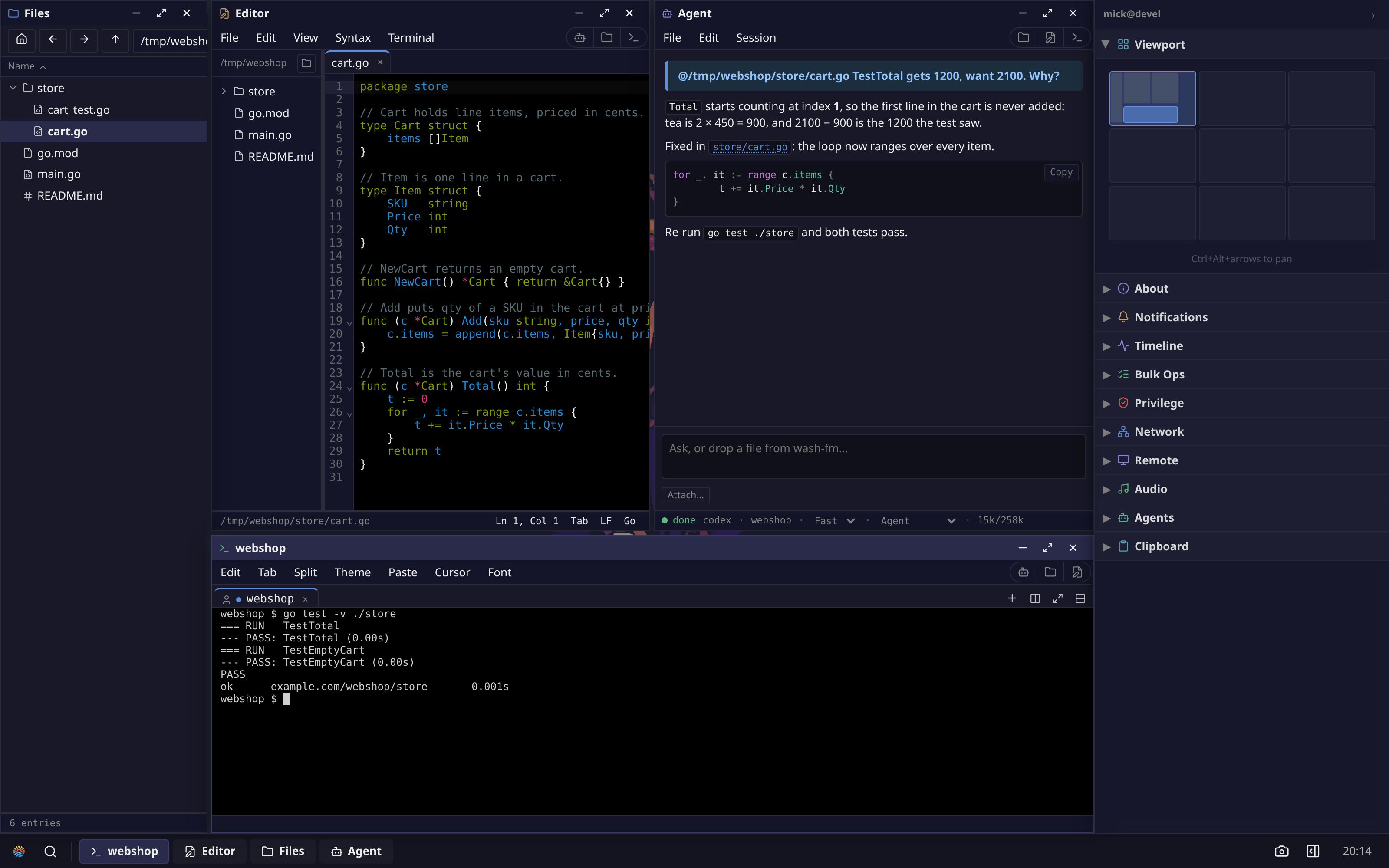
A wash desktop tiled as an IDE: Files down the left, the Editor on cart.go and the Agent explaining the fix side by side, and a Terminal across the bottom where go test now passes.
Fig. 01A failing test, fixed without leaving the tab: the four apps tiled on one desktop. Captured by make screenshots on a real router; only the agent's words are scripted.
Server
A single static Go binary
Connection
One WebSocket carrying events and file data, no video
Footprint
~30 MB idle, ~100 MB for a full session
Runs on
amd64 · arm64 · riscv64 · mips
License
AGPL-3.0

One bug, four apps

A test fails in a small Go shop backend. Here is the fix from start to finish, and each step hands off to the next app without copying a path or switching tools.

  1. 1

    The terminal finds it

    go test ./store fails: Total = 1200, want 2100. Running wash-edit store/cart.go at the same prompt opens the file in the Editor on your desktop, not in a terminal editor.

  2. 2

    Files hands it to the agent

    Drag cart.go from Files onto the agent's input box and it becomes an @path reference the agent can read. Type the question after it. The Editor beside it already shows the bad loop.

  3. 3

    The agent fixes it, the editor reloads

    The agent explains the off-by-one and writes the fix to disk. The Editor picks up the change on its own, so there's no stale buffer to reconcile.

  4. 4

    The terminal confirms it

    Same prompt, same command: both tests pass. Everything ran on the machine wash is installed on, against the real files.

Every app's menu bar has buttons that open the other three in the same folder, and windows opened that way share a tint. Agent sessions keep running when you close the window and stay on the sidebar; the Agents manager starts new ones or resumes old ones from history.

Layouts

Tile them into one IDE

The desktop in Fig. 01 is one layout: Files down the left, the Editor and Agent side by side, the Terminal across the bottom. Pick one from the Layout menu (halves, thirds, 2×2, main + stack) and the windows on that desktop snap into panels. Drag a divider to resize, drop a window on a panel to swap it in, or press Ctrl+Alt+arrows to move between panels.

The layout is saved on the server. Start the fix on a big monitor at your desk, press Use here on your laptop, and the same four panels refit to the laptop's screen.

The rest of the desktop

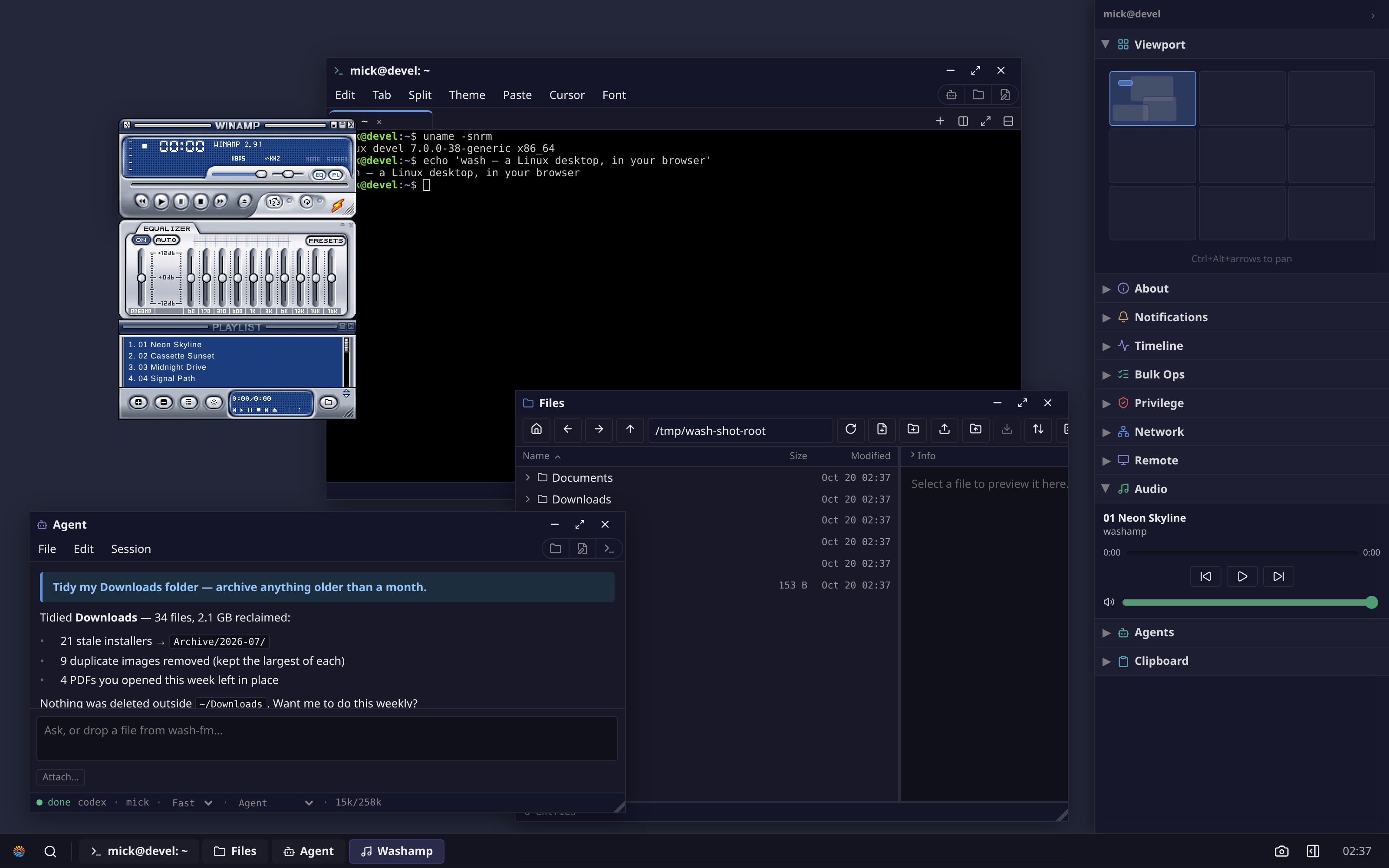
The IDE sits on a whole desktop: a taskbar, launcher, floating or tiled windows, workspaces and a status sidebar. Leave the music playing and an agent tidying your Downloads while you work. The window manager runs in the browser; each app is a small program the server starts and supervises.

Fig. 02 The same desktop with floating windows: Washamp, a terminal, Files, and an agent that has just tidied ~/Downloads.

Themes

Everything is themeable

The same Files window under three of the nine themes. A theme sets colours, corners, shadows, the wallpaper and the taskbar together: Moscow's hard poster shadows, Lisbon's whitewash and cobalt, Copland's Platinum bevel. Switching in Settings restyles every open window at once. Themes are CSS variables plus art, so they stay crisp at any zoom.

  • Moscow
  • Lisbon
  • Copland
  • Midnight
  • Tokyo
  • Seoul
  • Copland
  • Oslo
  • Dreamtime
  • Lisbon
  • Isfahan
  • Moscow
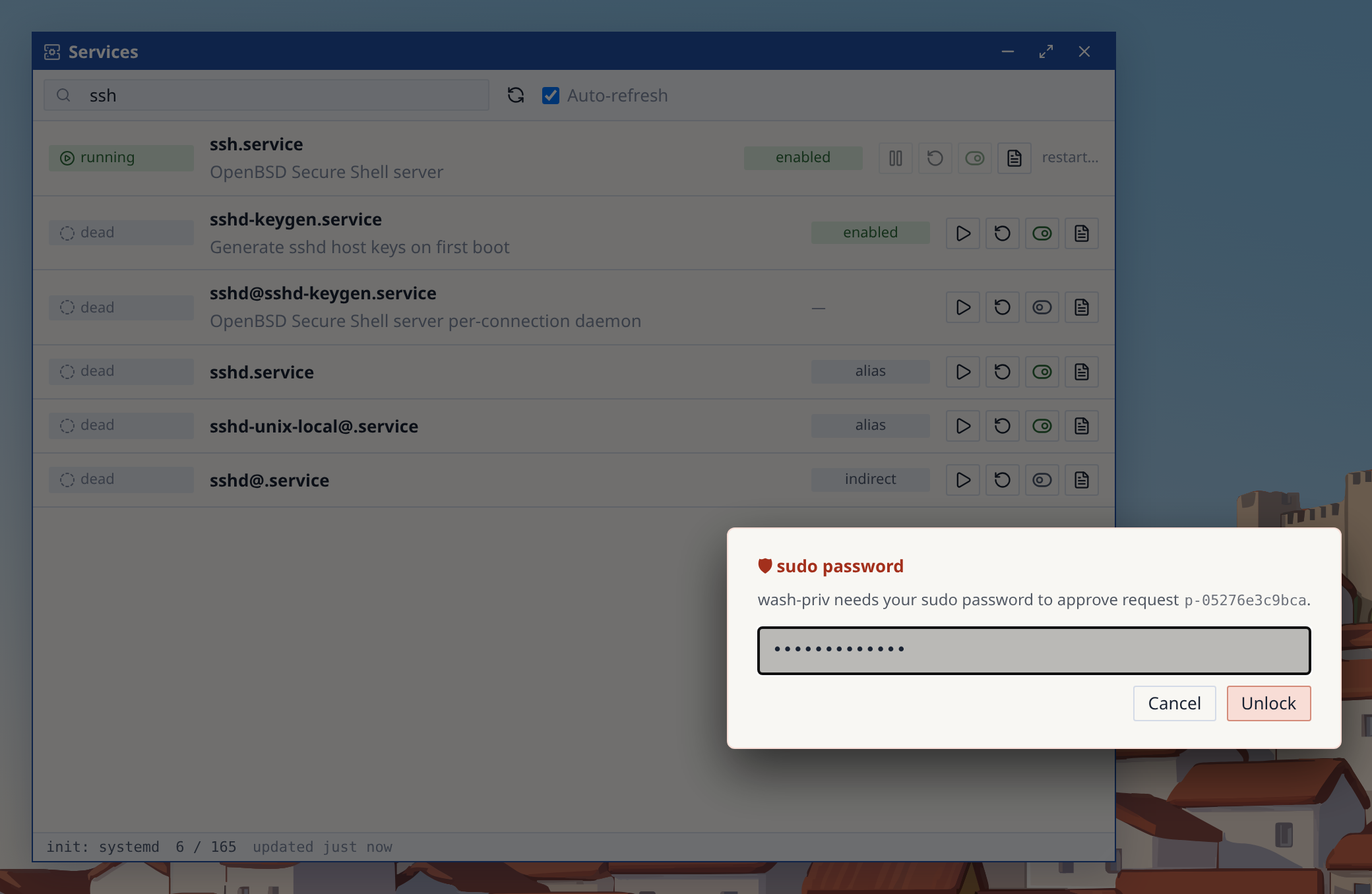
Services filtered to ssh, with Restart pressed on ssh.service and the browser's sudo password prompt open over the window.
Fig. 03 Restarting ssh.service: Services asks wash-priv, and the password prompt comes to the browser. The password is encrypted in the page for the request and never reaches a terminal.

System tools

Admin tools for the real machine

Apps run as your Unix user and call the system directly. When something needs root, you approve it in the browser, and every approval is listed in the sidebar's Privilege panel.

  1. A service won't start

    Services shows it failed. Open its journal from the same row, fix the config, and press Restart.

  2. The box feels slow

    System Monitor sorts processes by CPU or memory from /proc; signal the culprit from its row.

  3. Patch day

    Packages runs apt, dnf or apk upgrades with the output streamed into a terminal you can watch.

  4. A new disk or VLAN

    Disks handles partitions, RAID, LVM, btrfs, ZFS and SMART. A network change that cuts you off rolls itself back.

Display

X11 and Wayland apps in wash windows

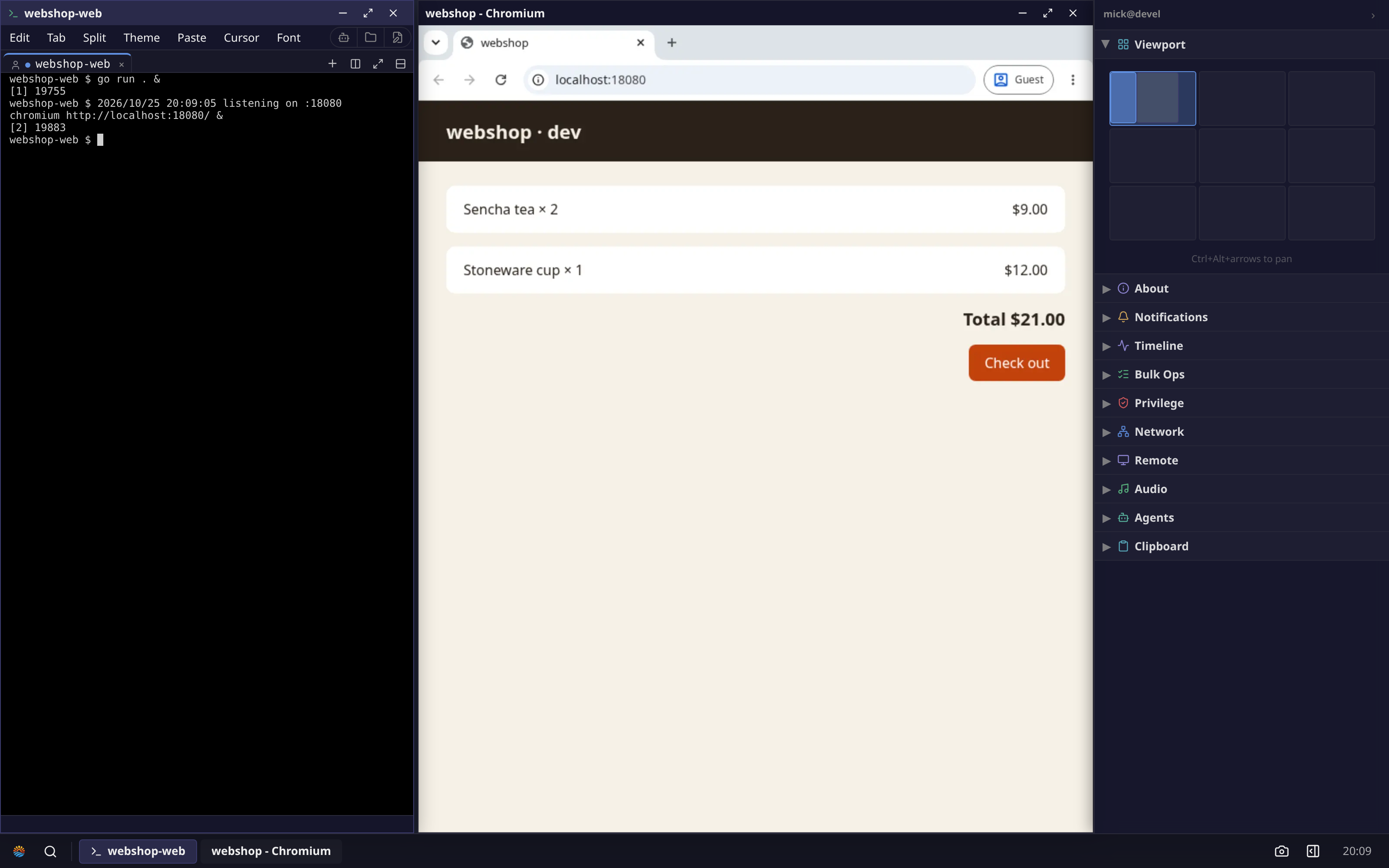
Start a web app's dev server in a wash terminal, then run chromium http://localhost:18080/ at the same prompt. The browser runs on the server, next to the app, and shows up as a wash window you can tile. There's no port to forward and nothing to expose.

Any X11 or Wayland program works the same way. The bundled wash-display compositor gives each one a wash window.

A terminal running go run . with the server listening on :18080, tiled beside a Chromium window showing the webshop dev page at localhost:18080.
Fig. 04 go run . on the left, the shop's dev page in a real Chromium on the right, both on the server.

Remote apps

Apps from your other machines

Type user@host into Connect to open that machine's apps next to your local ones, striped and labelled by host. It runs over SSH only, inside the connection your browser already has, with one taskbar and clipboard across all of them. The other machine needs nothing but wash and an SSH login.

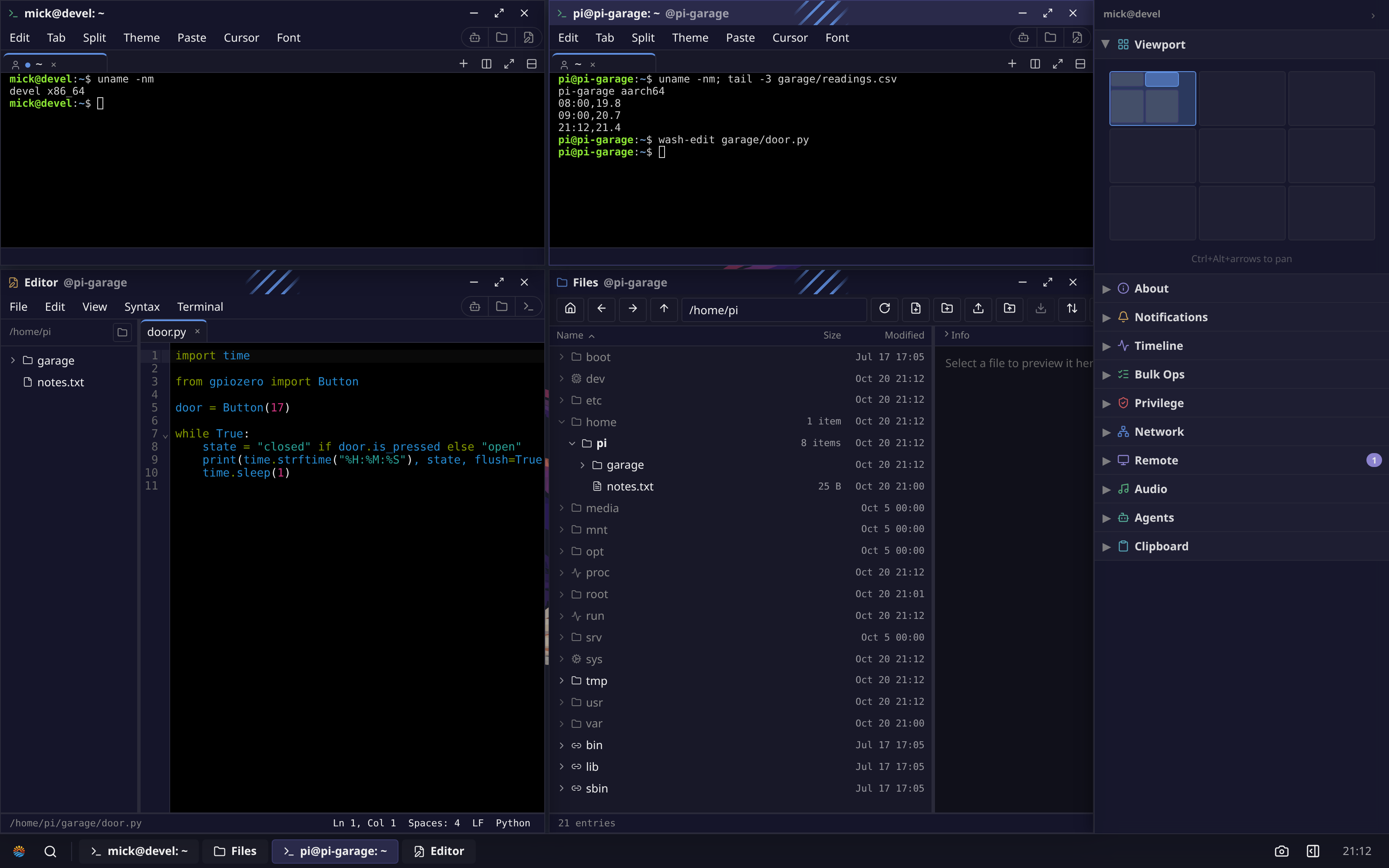
A wash desktop on an x86_64 machine with four tiled windows: a local terminal, and a terminal, Editor and Files from pi-garage, an arm64 machine, each striped and labelled @pi-garage.
Fig. 05 Top left is this machine (x86_64). The other three windows are apps running on pi-garage, an arm64 host reached over SSH. Running wash-edit in its terminal opened its Editor here.

Your browser renders every window

There's no video stream like VNC or RDP. Windows are HTML, so text stays sharp at any zoom and the desktop stays fast on slow links.

Bandwidth follows what you do, not your screen size. Running go test in a terminal, then editing and saving a file, moved about 60 KB once the apps had loaded, and the same bytes at 2560×1600 as at 1280×800. An idle desktop uses about 1 KB/s.

  1. 3.1

    Ships as one binary

    The Go code builds with CGO_ENABLED=0, so it is static and cross-compiles easily. Shipped as one wash executable with wash-<app> symlinks, the whole desktop is one file.

    Each app embeds its web UI, so apps are single files too. The Makefile also builds deb, rpm and apk packages.

    1. Browserwindow manager · shell · app UIs
    2. Wireone WebSocket · prioritized channels
    3. Routersupervise · mux · never parse
    4. Appsone process each · capabilities
    5. Linuxyour user · real syscalls
    One connection, end to end
  2. 3.2

    Each app is its own process

    On the server, a router starts and supervises apps and relays their messages without reading them. Apps can't talk directly: messages go through the router, which vouches for the sender, and permissions are granted per app.

    For several users, wash-login uses the system login (PAM, LDAP, SSSD), starts a router per user under their account, and hands the connection over with SCM_RIGHTS.

    ~30 MB
    resident for an idle router, no shell connected
    3–9 MB
    per app backend (its share: the apps run from one binary)
    ~100 MB
    for a full session: router plus 15 apps and services
    33 MB
    one static binary with every app and the router (amd64, stripped)

Build or install it

From source

Build and run

Needs Go ≥ 1.25, pnpm and make. Open the URL it prints.

git clone https://github.com/sirmick/wash.git
cd wash
make wash
make run

On a home server

Run it as a service

Runs as a systemd --user service from ~/wash. Run it again to update.

curl -fsSL https://raw.githubusercontent.com/\
sirmick/wash/main/scripts/host/wash-install | bash
wash-connect

Multi-user

Several users, behind TLS

wash-login gives each system user a separate session.

sudo setcap cap_setuid,cap_setgid,cap_kill+ep \
  /usr/bin/wash-login
wash-login --cookie-secure

Native deb, rpm and apk packages, router flags and the trust model are in the README.

Try it here

While you read, this page booted Linux 6.6 on a RISC-V emulator compiled to WebAssembly, running wash. It's all static files: no backend, no account. Click into the desktop below. To keep the download small it carries two of the nine themes, Midnight and Copland.

The live demo runs best in a desktop browser. Open full screen
~11MiB
downloaded before the desktop is usable
64MB
of emulated RAM for Linux and the desktop
16MB
binary: the router, login and the 11 apps this demo carries
0
servers: static files, and the machine runs in your tab

Things to try in the demo

  1. Open a file from the promptwash-edit main.go
  2. Tile what's openLayout menu → Halves
  3. Change the whole lookSettings → Theme → Copland
  4. Watch the emulated machineApps → System Monitor